
OrbEQ
Less tweaking. More music.
No subscriptions. No online activation required.
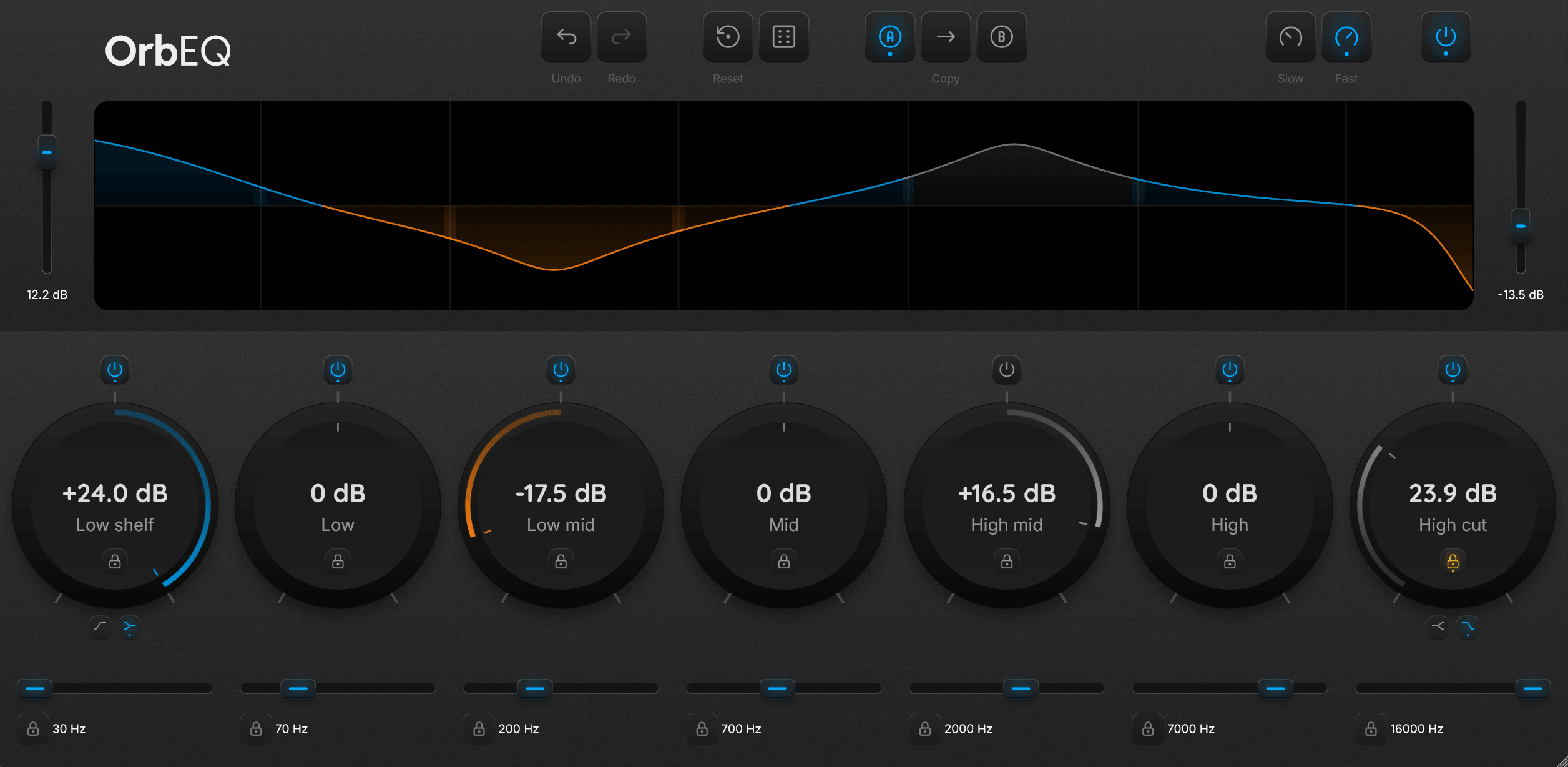
Built around how you actually mix
One-Click Randomization
Use smart randomization to generate new gain and frequency settings in one click. Explore fresh tonal ideas fast, then lock individual bands to keep what works.
Fast, Hands-On Mixing
Large, responsive gain dials make shaping your mix quick and hands-on. Use Shift for fine control or type exact values when needed.
Flexible 7-Band EQ
Seven fully controllable bands with switchable low/high shelf and cut modes let you handle everything from small tone tweaks to heavy reshaping.
Experiment Without Risk
A/B comparison with copy, undo/redo, per-band bypass, and global reset let you try anything and always get back safely.
Frequently Asked Questions
What does the Dice button do?
The Dice button instantly randomizes gain and frequency values across the EQ bands to generate a new tonal setup. Use it as a starting point or a fast way to find new sound directions. You can roll repeatedly until something clicks.
Can I protect settings I like when using Dice?
Yes. Each band includes a lock button that prevents it from changing during randomization or other adjustments. Lock the parts you want to keep, then continue exploring safely.
What is A/B mode used for?
A/B mode lets you store two different EQ settings and switch between them instantly. This makes it easy to compare mix decisions or test alternative tonal ideas. You can also copy settings between A and B.
What is the difference between shelf and cut modes?
Shelf mode boosts or reduces frequencies gradually beyond a selected point, making it useful for tonal shaping. Cut mode removes frequencies more aggressively, which is typically used for cleanup such as removing low rumble or harsh high frequencies.
Can I disable individual EQ bands?
Yes. Every band has its own bypass control, allowing you to quickly turn it on or off to hear exactly what it contributes to the sound.
Is OrbEQ meant for precise technical adjustments or fast workflow?
Speed first. The controls are big, direct, and made for working by ear. You can still type exact values or hold Shift for fine adjustment when you need to.
Is there a demo video I can watch to get a feel for how the plugin works?
Not yet. I'm waiting on a review from a YouTuber; once that's available, I'll link it here so you can see OrbEQ in action before you decide.
System Requirements
- Windows 10 or Windows 11 (64-bit)
- VST3-compatible DAW (64-bit required)
- Tested in Bitwig Studio and FL Studio
- Intel or AMD x64 CPU
- 4 GB RAM minimum (8 GB recommended)
- < 100 MB disk space
- No dedicated GPU required
- Internet required for download only